Oct 20, 2009

µTorrent 1.8.4


What Is µTorrent?

Micro-Sized Yet Feature Filled

µTorrent is the world's most popular BitTorrent client. Most of the features present in other BitTorrent clients are present in µTorrent, including bandwidth prioritization, scheduling, RSS auto-downloading and Mainline DHT (compatible with BitComet). Additionally, µTorrent supports the Protocol Encryption joint specification (compatible with Azureus 2.4.0.0 and above, BitComet 0.63 and above) and peer exchange.

Resource-Friendly

µTorrent was written with efficiency in mind. Unlike many torrent clients, it does not hog valuable system resources - typically using less than 6MB of memory, allowing you to use the computer as if it weren't there at all. Additionally, the program itself is contained within a single executable less than 220 KB in size.

Skinnable and Localized

Various icon, toolbar graphic and status icon replacements are available, and creating your own is very simple. µTorrent also has support for localization, and with a language file present, will automatically switch to your system language. If your language isn't available, you can easily add your own, or edit other existing translations to improve them!

Actively Developed and Improved

The development team puts in a lot of time working on features and making things more user-friendly. Releases only come out when they're ready, with no schedule pressures, so the few bugs that appear are quickly addressed and fixed.

Screenshots

Bengali Songs


4.37 MB
none
20 Oct, 2009
3.94 MB
none
20 Oct, 2009
4.03 MB
none
20 Oct, 2009
4.99 MB
none
20 Oct, 2009
3.92 MB
none
20 Oct, 2009
1,049.15 KB
none
20 Oct, 2009

JAVA update


What is Java?


Java allows you to play online games, chat with people around the world, calculate your mortgage interest, and view images in 3D, just to name a few. It's also integral to the intranet applications and other e-business solutions that are the foundation of corporate computing.

Opera 10.10 Beta 1 (Build 1833)


A full-featured Internet browser, Opera includes pop-up blocking, tabbed browsing, integrated searches, and advanced functions like Opera's groundbreaking E-mail program, RSS Newsfeeds and IRC chat. And because we know that our users have different needs, you can customize the look and content of your Opera browser with a few clicks of the mouse.
  • Speed Dial: Your favorite sites are just one click away at all times.
  • Search Shortcuts: Faster search – type your queries directly into the address bar.
  • Trash Can: Instantly reopen recently closed tabs.
  • Speed Dial: Get your favorite Web page with just one click.
  • Mouse Gestures: With Opera you can navigate the Web with your mouse.
  • Opera Link: Synchronize data of your choice online, or among different computers and devices.
  • Quick Find: Opera remembers not only the titles and addresses, but also the actual content of the Web pages you visit.
  • Feed Preview: Preview a Feed by clicking on the feed icon, and you will see it in clean and efficient multiple-column layout.
  • Quick and customizable Web search: Get quick access to Google, eBay, Amazon and more with the search field in the upper right corner

Wallpapers..........

Download Wallpapers..

Oct 17, 2009

Kaspersky Internet Security 2010


Homepage: http://www.kaspersky.com/kaspersky_internet_security


Complete PC Protection

Kaspersky Internet Security 2010 automatically protects you and your family at all times – whether you work, bank, shop or play online.
Kaspersky Internet Security 2010 has everything you need for a safe and secure Internet experience.
All the features and technologies of Kaspersky Anti-Virus 2010 are included in this product.


Fully Automated Real-Time Protection:
======================================
Kaspersky Internet Security stops your PC being slowed down by cybercriminals and delivers unsurpassed on-line safety whilst protecting your files, music and photos from hackers:

-Keeps your money and identity safe Improved!
-Protects against bank account fraud
-Safeguards against online shopping threats
-Cybercriminals won’t hi-jack your PC
-Family protection from on-line predators
-Your files won’t be ruined by hackers Improved!
-Keeps your PC running smoothly
-Safer Wi-Fi connections
-Two way personal firewal


New And Improved Features:
============================
Kaspersky Internet Security 2010 offers a number of new and improved features together with unique protection technologies to address the latest online threats, keep your PC running smoothly and customize protection according to your activities:

-Unique Safe Run Mode for questionable applications and websites New!
-Security Application Monitor to give you full picture on programs installed on your PC Improved!
-Identity Information Controller to give valuable data an extra layer of protection Improved!
-Kaspersky Toolbar for Internet browsers to warn you about infected or unsafe websites New!
-Advanced identity theft protection, including improved secure Virtual Keyboard Improved!
-Urgent Detection System to stop fast emerging threats Improved!
-Next generation proactive protection from zero-day attacks and unknown threats Improved!
-Special Game Mode to suspend alerts, updates and scans while you play New!


Advanced Features For Better Protection:
=========================================
Kaspersky Internet Security 2010 has a range of unique tools for heightened security. Protecting your family and keeping your PC healthy:

-Run questionable applications and websites in Safe Run Mode New!
-Enter logins and passwords using secure Virtual Keyboard Improved!
-Enable Parental Control for added child safety online
-Turn on Game Mode to suspend alerts, updates and scans New!
-Add folders and files with valuable data to the protected area Improved!
-Scan system and installed applications for vulnerabilities
-View applications working on your PC and customize their rules
-Tune up your OS and Internet browser settings for better security
-Restore correct system settings after malware removal
-Burn a Rescue CD to restore your system in case of infection Improved!
-Remove activity traces in your Internet browser (history, cookies, etc.)


Get Protection From a Range of Threats:
=========================================
Award-winning technologies in Kaspersky Internet Security 2010 protect you from cybercrime and a wide range of IT threats:

-Viruses, Trojans, worms and other malware, spyware and adware
-Rootkits, bootkits and other complex threats
-Identity theft by keyloggers, screen capture malware or phishing scams
-Botnets and various illegal methods of taking control of your PC
-Zero-day attacks, new fast emerging and unknown threats
-Drive-by download infections, network attacks and intrusions
-Unwanted, offensive web content and spam


System Requirements:
=====================

Required for all installations:
--------------------------------
-300 MB free space on the hard drive (the exact number is based on antivirus database size)
-CD-ROM (for installation of the program from CD)
-Computer mouse
-Internet connection (for product activation)
-Microsoft Internet Explorer 6 or higher (for downloading updates)
-Microsoft Windows Installer 2.0 or higher

Operating Systems:
-------------------
-Microsoft Windows XP, all editions (Service Pack 2 and higher)
-Microsoft Windows Vista, all editions (32/64 bit)

Hardware Requirements:
-----------------------
-Intel Pentium 300 MHz or higher (or equivalent)
-256 MB available RAM
-Intel Pentium 800 MHz 32 bit (x86) / 64 bit (x64) or higher (or equivalent)
-512 MB available RAM


***********************************************************************************
NOTE: If You Like Kaspersky Products And You Can Afford Them, Do Buy A License To Support It's Developers.
-----------------------------------------------------------------------------------

Tested And Working...
Scanned (With Kaspersky) And 100% Clean.


Download

Google Chrome 4.0.222.12 Beta


Google Chrome is a browser that combines a minimal design with sophisticated technology to make the web faster, safer, and easier. Google Chrome combines a minimal design with sophisticated technology to make the web faster, safer, and easier.
One box for everything
Type in the address bar and get suggestions for both search and web pages.
Thumbnails of your top sites
Access your favorite pages instantly with lightning speed from any new tab.
Incognito mode
Don't want pages you visit to show up in your web history? Choose incognito mode for private browsing.
Safe browsing
Google Chrome warns you if you're about to visit a suspected phishing, malware or otherwise unsafe website.
For information about alpha and developer builds, check out the Chrome dev channel here.


WinZip 14.0.8652


WinZip is the most trusted way to work with compressed files. No other compression utility is as easy-to-use or offers the comprehensive and productivity-enhancing approach that has made WinZip the gold standard for file-compression tools.
You can quickly and securely zip and unzip files to conserve storage space, speed up e-mail transmission, and reduce download times. State-of-the-art file compression, strong AES encryption, compatibility with more compression formats, and new intuitive photo compression, make WinZip the complete compression and archiving solution.
Building on the favorite features of a worldwide base of several million users, WinZip 12 adds new features for image compression and management, support for new compression methods, improved compression performance, support for additional archive formats, and more. Users can work faster, smarter, and safer.

Yahoo! Messenger 10.0.0.542 Beta


Keep friends at your fingertips with the new Yahoo! Messenger:
  • Easier ways to stay up to date - See more updates from your friends in the detailed Messenger list
  • Show off your status - Easily add links and emoticons to your status messages
  • Watch videos together - Share videos from popular sites and watch them with friends right in your IM window
Other features include:
  1. Instant message with one friend, or conference in a bunch
  2. Send text messages (SMS) to friends' mobile phones
  3. Join a chat room to meet new friends while you discuss your favorite topics
  4. Make free PC-to-PC calls and PC-to-phone calls for as low as 1¢ a minute (plus free voicemail!)
  5. Use the built-in media player to watch web videos and view photos with friends
  6. Show your style with emoticons, Avatars, audibles and IMVironments
  7. Share securely with automatic file scanning for users of Norton AntiVirus or Internet Security 2007/2008

Change Log


- Improvements in the webcam detection logic: If you were able to use your webcam on 9.0 or other IM programs, but not on Yahoo! Messenger 10, this fix should take care of the issue.

- Explanation for grayed-out video call button: If your video call button is grayed-out when you’re IM’ing with a friend, it’s because they’re on an older version of Yahoo! Messenger. In order to receive your video call, they also need to upgrade to Yahoo! Messenger 10 Beta. To help reduce confusion about this, we added an inline message explaining this.

- Smoother handling of unanswered calls: When you make a call to a friend but they don’t answer within 20 seconds, the call is automatically terminated. Previously there was no messaging about this, so we added one to let you know that your friend did not answer your call.

- Better explanation for downgraded video calls: In the event your internet connection can no longer support the full video call (e.g. video + voice), the conversation gets downgraded to a voice-only call. When this happens, the video picture disappears. This is the correct behavior, but we added some inline messaging so you’ll know when and why it’s happening.


Oct 8, 2009

Mozilla Firefox 3.6 Alpha 1


 Firefox is a free, open-source and cross-platform web browser for Windows, Linux, MacOS X and other operating systems. It is small, fast and easy to use, and offers many advantages over other web browsers, such as the tabbed browsing and the ability to block pop-up windows.

Oct 7, 2009

The Android 1.6 SDK


I am happy to let you know that Android 1.6 SDK is available for download. Android 1.6, which is based on the donut branch from the Android Open Source Project, introduces a number of new features and technologies. With support for CDMA and additional screen sizes, your apps can be deployed on even more mobile networks and devices. You will have access to new technologies, including framework-level support for additional screen resolutions, like QVGA and WVGA, new telephony APIs to support CDMA, gesture APIs, a text-to-speech engine, and the ability to integrate with Quick Search Box. What's new in Android 1.6 provides a more complete overview of this platform update.
The Android 1.6 SDK requires a new version of Android Development Tools (ADT). The SDK also includes a new tool that enables you to download updates and additional components, such as new add-ons or platforms.
You can expect to see devices running Android 1.6 as early as October. As with previous platform updates, applications written for older versions of Android will continue to run on devices with Android 1.6. Please test your existing apps on the Android 1.6 SDK to make sure they run as expected.
Over the next several weeks, we will publish a series of blog posts to help you get ready for the new developer technologies in Android 1.6. The following topics, and more, will be covered: how to adapt your applications to support different screen sizes, integrating with Quick Search Box, building gestures into your apps, and using the text-to-speech engine.

If you are interested to see some highlights of Android 1.6, check out the video below.

Junk File Remover Went Public

Digeus, Inc. has announced the release of Junk Files Remover, Top powerful disk cleaner program that can be safely used to perform disk cleanup for Vista, XP and any other platform. Junk Files Remover will optimize, clean and boost the speed of your Windows. Keep your PC clean of junk files with this disk cleaner utility and enjoy your top speed system performance.

http://www.digeus.com

Every day the programs you run on your computer create temporary and obsolete files and leave them behind on your hard disk. These junk files build up over time, take up valuable hard disk space and slow down your system performance.

Junk Files Remover provides the basic functionality for disk cleaning by quickly identifying the junk files and folders on a hard drive, and displays the results in a convenient view. Even if you do not know much about computers or files, you cannot make a mistake, as the disk clean up software finds only unused data and safely removes it for you!

Junk Files Remover identifies more than 50 types of obsolete files, and you can freely add the type of junk file which you consider.

After Junk Files Remover analyzes your system for find junk files, you can individually view each of the obsolete file found and call up a detailed description. If you wish, you can also clean up all junk files automatically.

After using disk cleaner program you will have more disk space at your disposal so you can install more programs and games, have more music and video, and you will be amazed that your computer will work even faster than new one.

Benefits

• Optimize, clean and boost the speed of your Windows.
• Run applications smoothly and reduce crashes.
• Load Windows faster.
• Protect your privacy and security.
• Regain disk space.
• Fix certain application errors.
• No need to spend too much time; do it ultra fast.
• Runs much more quickly than others in its class and is very safe

Use Junk Files Remover and does your PC clean up with pleasure.

New Software : Allworx 6.5

Allworx has chosen Internet Telephony Conference & EXPO to share with me the details of their latest software release, Allworx 6.5. The software upgrade affects the whole family of products, including the 6x, 10x, and 24x platforms.
 
The new functionality includes the following:
 
  • Enhanced T1 Provisioning Capabilities
  • New Multisite Extensions
  • IMAP4 Support
  • Enhanced Conference Call Support, and
  • New Presence-Specific Messaging
 Allworx continues to serve the SMB market in a variety of interesting ways. Sandra Gault of Allworx told me of a dealer that is combining the Allworx platform with service from Bandwidth.com to offer a hosted SMB VoIP service to customers. So far the take-up has apparently been good, and the recurring revenue stream makes it a win-win for the dealer as well.

Antivirus Software AVG 9 Released – AVG 9 Free Downloads Soon


Security software companies like Symantec, Kaspersky or AVG are releasing new versions of their software programs every year. This year will be a special year though with the release of Microsoft’s new operating system Windows 7 on October 22. Many users will now not only ask about the new features and improvements of the antivirus programs but also if and how they will run under Windows 7. AVG hat a bad year with AVG 8. Many users felt that it was a resource hog, slowing down system start and operations in Windows. It is still one of the most popular (and free) antivirus software programs out there and many of its users are waiting for the AVG 9 free release.
AVG has already release the commercial version of AVG 9 which can be downloaded and purchased from the AVG homepage. AVG 9 Free will be released on October 15 to the public and downloads will be available from the usual sources including the AVG website but also every major download portal.


So what has changed between AVG 9 and AVG 8.5?
The homepage lists three new and improved features without going into detail:
  • NEW Enhanced Firewall
    (only available in AVG Internet Security) Prevents hackers from seeing inside your computer
  • NEW Superior Phishing Protection Checks to make sure web pages really are what they appear to be
  • NEW Enhanced Anti-Spam (only available in AVG Internet Security) Blocks spammers and scammers from clogging your system
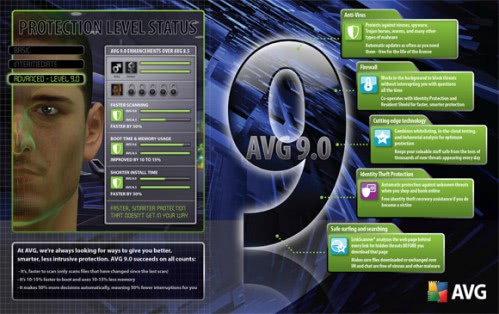
AVG goes into greater detail when it comes to the performance improvements in AVG 9. They say that their newest antivirus software AVG 9 runs up to 50% faster than previous versions, boots up to 10-15% faster, uses 10-15% less computer memory while running and that it now takes less time and clicks to complete installations of the AVG software.
AVG 9 Free downloads are not live yet but will be from October 15 on. The downloads for the free version of AVG will be available at this site. Upgrades from AVG 8 will be handled by the installer of AVG 9 automatically. AVG 9 and AVG 9 free will be compatible with 32-bit and 64-bit editions of Windows 7, Windows Vista and Windows XP.
Serial Key

Get cash from your website. Sign up as affiliate.